

チュートリアル 2: 正則化手法 パート2
第2週, 第1日目: 正則化
Neuromatch Academyによる
コンテンツ作成者: ラヴィ・テジャ・コンキマラ、モヒトラジュ・リンガン・クマライアン、ケビン・マチャド・ガンボア、ケルソン・シリング-スクリボ、ライル・ウンガー
コンテンツレビュアー: ピユシュ・チャウハン、バイ・スイウェイ、ケルソン・シリング-スクリボ
コンテンツ編集者: ロベルト・グイドッティ、スピロス・チャブリス
制作編集者: サイード・サレヒ、ガガナ・B、スピロス・チャブリス
チュートリアルの目的
- 過剰パラメータ化モデルの縮小としての正則化:L1およびL2
- ドロップアウトによる正則化
- データ拡張による正則化
- ハイパーパラメータ調整の危険性
- 一般化の再考
# @title Tutorial slides
from IPython.display import IFrame
link_id = "7um6p"
print(f"If you want to download the slides: https://osf.io/download/{link_id}/")
IFrame(src=f"https://mfr.ca-1.osf.io/render?url=https://osf.io/{link_id}/?direct%26mode=render%26action=download%26mode=render", width=854, height=480)
セットアップ
本日のコードの一部は実行に最大1時間かかることがあります。そのため、そのコードは「非表示」にし、結果の出力のみを示しています。
# @title Install dependencies

# @markdown **WARNING**: There may be *errors* and/or *warnings* reported during the installation. However, they should be ignored.
# @title Install and import feedback gadget
from vibecheck import DatatopsContentReviewContainer
def content_review(notebook_section: str):
return DatatopsContentReviewContainer(
"", # No text prompt
notebook_section,
{
"url": "https://pmyvdlilci.execute-api.us-east-1.amazonaws.com/klab",
"name": "neuromatch_dl",
"user_key": "f379rz8y",
},
).render()
feedback_prefix = "W2D1_T2"# Imports
import copy
import torch
import random
import pathlib
import numpy as np
import matplotlib.pyplot as plt
import matplotlib.animation as animation
import torch.nn as nn
import torch.optim as optim
import torch.nn.functional as F
from torchvision import transforms
from torchvision.datasets import ImageFolder
from tqdm.auto import tqdm
from IPython.display import HTML, display# @title Figure Settings
import logging
logging.getLogger('matplotlib.font_manager').disabled = True
import ipywidgets as widgets
%matplotlib inline
%config InlineBackend.figure_format = 'retina'
plt.style.use("https://raw.githubusercontent.com/NeuromatchAcademy/content-creation/main/nma.mplstyle")# @title Loading Animal Faces Data
import requests, os
from zipfile import ZipFile
print("Start downloading and unzipping `AnimalFaces` dataset...")
name = 'afhq'
fname = f"{name}.zip"
url = f"https://osf.io/kgfvj/download"
if not os.path.exists(fname):
r = requests.get(url, allow_redirects=True)
with open(fname, 'wb') as fh:
fh.write(r.content)
if os.path.exists(fname):
with ZipFile(fname, 'r') as zfile:
zfile.extractall(f".")
os.remove(fname)
print("Download completed.")# @title Loading Animal Faces Randomized data
print("Start downloading and unzipping `Randomized AnimalFaces` dataset...")
names = ['afhq_random_32x32', 'afhq_10_32x32']
urls = ["https://osf.io/9sj7p/download",
"https://osf.io/wvgkq/download"]
for i, name in enumerate(names):
url = urls[i]
fname = f"{name}.zip"
if not os.path.exists(fname):
r = requests.get(url, allow_redirects=True)
with open(fname, 'wb') as fh:
fh.write(r.content)
if os.path.exists(fname):
with ZipFile(fname, 'r') as zfile:
zfile.extractall(f".")
os.remove(fname)
print("Download completed.")# @title Plotting functions
def imshow(img):
"""
Display unnormalized image
Args:
img: np.ndarray
Datapoint to visualize
Returns:
Nothing
"""
img = img / 2 + 0.5 # Unnormalize
npimg = img.numpy()
plt.imshow(np.transpose(npimg, (1, 2, 0)))
plt.axis(False)
plt.show()
def plot_weights(norm, labels, ws, title='Weight Size Measurement'):
"""
Plot of weight size measurement [norm value vs layer]
Args:
norm: float
Norm values
labels: list
Targets
ws: list
Weights
title: string
Title of plot
Returns:
Nothing
"""
plt.figure(figsize=[8, 6])
plt.title(title)
plt.ylabel('Frobenius Norm Value')
plt.xlabel('Model Layers')
plt.bar(labels, ws)
plt.axhline(y=norm,
linewidth=1,
color='r',
ls='--',
label='Total Model F-Norm')
plt.legend()
plt.show()
def visualize_data(dataloader):
"""
Helper function to visualize data
Args:
dataloader: torch.tensor
Dataloader to visualize
Returns:
Nothing
"""
for idx, (data,label) in enumerate(dataloader):
plt.figure(idx)
# Choose the datapoint you would like to visualize
index = 22
# Choose that datapoint using index and permute the dimensions
# and bring the pixel values between [0,1]
data = data[index].permute(1, 2, 0) * \
torch.tensor([0.5, 0.5, 0.5]) + \
torch.tensor([0.5, 0.5, 0.5])
# Convert the torch tensor into numpy
data = data.numpy()
plt.imshow(data)
plt.axis(False)
image_class = classes[label[index].item()]
print(f'The image belongs to : {image_class}')
plt.show()# @title Helper functions
class AnimalNet(nn.Module):
"""
Network Class - Animal Faces with following structure:
nn.Linear(3 * 32 * 32, 128) # Fully connected layer 1
nn.Linear(128, 32) # Fully connected layer 2
nn.Linear(32, 3) # Fully connected layer 3
"""
def __init__(self):
"""
Initialize parameters of AnimalNet
Args:
None
Returns:
Nothing
"""
super(AnimalNet, self).__init__()
self.fc1 = nn.Linear(3 * 32 * 32, 128)
self.fc2 = nn.Linear(128, 32)
self.fc3 = nn.Linear(32, 3)
def forward(self, x):
"""
Forward Pass of AnimalNet
Args:
x: torch.tensor
Input features
Returns:
output: torch.tensor
Outputs/Predictions
"""
x = x.view(x.shape[0], -1)
x = F.relu(self.fc1(x))
x = F.relu(self.fc2(x))
x = self.fc3(x)
output = F.log_softmax(x, dim=1)
return output
class Net(nn.Module):
"""
Network Class - 2D with following structure
nn.Linear(1, 300) + leaky_relu(self.fc1(x)) # First fully connected layer
nn.Linear(300, 500) + leaky_relu(self.fc2(x)) # Second fully connected layer
nn.Linear(500, 1) # Final fully connected layer
"""
def __init__(self):
"""
Initialize parameters of Net
Args:
None
Returns:
Nothing
"""
super(Net, self).__init__()
self.fc1 = nn.Linear(1, 300)
self.fc2 = nn.Linear(300, 500)
self.fc3 = nn.Linear(500, 1)
def forward(self, x):
"""
Forward pass of Net
Args:
x: torch.tensor
Input features
Returns:
x: torch.tensor
Output/Predictions
"""
x = F.leaky_relu(self.fc1(x))
x = F.leaky_relu(self.fc2(x))
output = self.fc3(x)
return output
class BigAnimalNet(nn.Module):
"""
Network Class - Animal Faces with following structure:
nn.Linear(3*32*32, 124) + leaky_relu(self.fc1(x)) # First fully connected layer
nn.Linear(124, 64) + leaky_relu(self.fc2(x)) # Second fully connected layer
nn.Linear(64, 3) # Final fully connected layer
"""
def __init__(self):
"""
Initialize parameters for BigAnimalNet
Args:
None
Returns:
Nothing
"""
super(BigAnimalNet, self).__init__()
self.fc1 = nn.Linear(3*32*32, 124)
self.fc2 = nn.Linear(124, 64)
self.fc3 = nn.Linear(64, 3)
def forward(self, x):
"""
Forward pass of BigAnimalNet
Args:
x: torch.tensor
Input features
Returns:
x: torch.tensor
Output/Predictions
"""
x = x.view(x.shape[0],-1)
x = F.leaky_relu(self.fc1(x))
x = F.leaky_relu(self.fc2(x))
x = self.fc3(x)
output = F.log_softmax(x, dim=1)
return output
def train(args, model, train_loader, optimizer, epoch,
reg_function1=None, reg_function2=None, criterion=F.nll_loss):
"""
Trains the current input model using the data
from Train_loader and Updates parameters for a single pass
Args:
args: dictionary
Dictionary with epochs: 200, lr: 5e-3, momentum: 0.9, device: DEVICE
model: nn.module
Neural network instance
train_loader: torch.loader
Input dataset
optimizer: function
Optimizer
reg_function1: function
Regularisation function [default: None]
reg_function2: function
Regularisation function [default: None]
criterion: function
Specifies loss function [default: nll_loss]
Returns:
model: nn.module
Neural network instance post training
"""
device = args['device']
model.train()
for batch_idx, (data, target) in enumerate(train_loader):
data, target = data.to(device), target.to(device)
optimizer.zero_grad()
output = model(data)
# L1 regularization
if reg_function2 is None and reg_function1 is not None:
loss = criterion(output, target) + args['lambda1']*reg_function1(model)
# L2 regularization
elif reg_function1 is None and reg_function2 is not None:
loss = criterion(output, target) + args['lambda2']*reg_function2(model)
# No regularization
elif reg_function1 is None and reg_function2 is None:
loss = criterion(output, target)
# Both L1 and L2 regularizations
else:
loss = criterion(output, target) + args['lambda1']*reg_function1(model) + args['lambda2']*reg_function2(model)
loss.backward()
optimizer.step()
return model
def test(model, test_loader, loader='Test', criterion=F.nll_loss,
device='cpu'):
"""
Tests the current model
Args:
model: nn.module
Neural network instance
device: string
GPU/CUDA if available, CPU otherwise
test_loader: torch.loader
Test dataset
criterion: function
Specifies loss function [default: nll_loss]
Returns:
test_loss: float
Test loss
"""
model.eval()
test_loss = 0
correct = 0
with torch.no_grad():
for data, target in test_loader:
data, target = data.to(device), target.to(device)
output = model(data)
test_loss += criterion(output, target, reduction='sum').item() # sum up batch loss
pred = output.argmax(dim=1, keepdim=True) # Get the index of the max log-probability
correct += pred.eq(target.view_as(pred)).sum().item()
test_loss /= len(test_loader.dataset)
return 100. * correct / len(test_loader.dataset)
def main(args, model, train_loader, val_loader, test_data,
reg_function1=None, reg_function2=None, criterion=F.nll_loss):
"""
Trains the model with train_loader and
tests the learned model using val_loader
Args:
args: dictionary
Dictionary with epochs: 200, lr: 5e-3, momentum: 0.9, device: DEVICE
model: nn.module
Neural network instance
train_loader: torch.loader
Train dataset
val_loader: torch.loader
Validation set
reg_function1: function
Regularisation function [default: None]
reg_function2: function
Regularisation function [default: None]
Returns:
val_acc_list: list
Log of validation accuracy
train_acc_list: list
Log of training accuracy
param_norm_list: list
Log of frobenius norm
trained_model: nn.module
Trained model/model post training
"""
device = args['device']
model = model.to(device)
optimizer = optim.SGD(model.parameters(), lr=args['lr'], momentum=args['momentum'])
val_acc_list, train_acc_list,param_norm_list = [], [], []
for epoch in tqdm(range(args['epochs'])):
trained_model = train(args, model, train_loader, optimizer, epoch,
reg_function1=reg_function1,
reg_function2=reg_function2)
train_acc = test(trained_model, train_loader, loader='Train', device=device)
val_acc = test(trained_model, val_loader, loader='Val', device=device)
param_norm = calculate_frobenius_norm(trained_model)
train_acc_list.append(train_acc)
val_acc_list.append(val_acc)
param_norm_list.append(param_norm)
return val_acc_list, train_acc_list, param_norm_list, model
def calculate_frobenius_norm(model):
"""
Function to calculate frobenius norm
Args:
model: nn.module
Neural network instance
Returns:
norm: float
Frobenius norm
"""
norm = 0.0
# Sum the square of all parameters
for name,param in model.named_parameters():
norm += torch.norm(param).data**2
# Return a square root of the sum of squares of all the parameters
return norm**0.5
def early_stopping_main(args, model, train_loader, val_loader, test_data):
"""
Function to simulate early stopping
Args:
args: dictionary
Dictionary with epochs: 200, lr: 5e-3, momentum: 0.9, device: DEVICE
model: nn.module
Neural network instance
train_loader: torch.loader
Train dataset
val_loader: torch.loader
Validation set
Returns:
val_acc_list: list
Val accuracy log until early stop point
train_acc_list: list
Training accuracy log until early stop point
best_model: nn.module
Model performing best with early stopping
best_epoch: int
Epoch at which early stopping occurs
"""
device = args['device']
model = model.to(device)
optimizer = optim.SGD(model.parameters(), lr=args['lr'], momentum=args['momentum'])
best_acc = 0.0
best_epoch = 0
# Number of successive epochs that you want to wait before stopping training process
patience = 20
# Keps track of number of epochs during which the val_acc was less than best_acc
wait = 0
val_acc_list, train_acc_list = [], []
for epoch in tqdm(range(args['epochs'])):
trained_model = train(args, model, device, train_loader, optimizer, epoch)
train_acc = test(trained_model, train_loader, loader='Train', device=device)
val_acc = test(trained_model, val_loader, loader='Val', device=device)
if (val_acc > best_acc):
best_acc = val_acc
best_epoch = epoch
best_model = copy.deepcopy(trained_model)
wait = 0
else:
wait += 1
if (wait > patience):
print(f'Early stopped on epoch: {epoch}')
break
train_acc_list.append(train_acc)
val_acc_list.append(val_acc)
return val_acc_list, train_acc_list, best_model, best_epoch# @title Set random seed
# @markdown Executing `set_seed(seed=seed)` you are setting the seed
# For DL its critical to set the random seed so that students can have a
# baseline to compare their results to expected results.
# Read more here: https://pytorch.org/docs/stable/notes/randomness.html
# Call `set_seed` function in the exercises to ensure reproducibility.
import random
import torch
def set_seed(seed=None, seed_torch=True):
"""
Function that controls randomness. NumPy and random modules must be imported.
Args:
seed : Integer
A non-negative integer that defines the random state. Default is `None`.
seed_torch : Boolean
If `True` sets the random seed for pytorch tensors, so pytorch module
must be imported. Default is `True`.
Returns:
Nothing.
"""
if seed is None:
seed = np.random.choice(2 ** 32)
random.seed(seed)
np.random.seed(seed)
if seed_torch:
torch.manual_seed(seed)
torch.cuda.manual_seed_all(seed)
torch.cuda.manual_seed(seed)
torch.backends.cudnn.benchmark = False
torch.backends.cudnn.deterministic = True
print(f'Random seed {seed} has been set.')
# In case that `DataLoader` is used
def seed_worker(worker_id):
"""
DataLoader will reseed workers following randomness in
multi-process data loading algorithm.
Args:
worker_id: integer
ID of subprocess to seed. 0 means that
the data will be loaded in the main process
Refer: https://pytorch.org/docs/stable/data.html#data-loading-randomness for more details
Returns:
Nothing
"""
worker_seed = torch.initial_seed() % 2**32
np.random.seed(worker_seed)
random.seed(worker_seed)# @title Set device (GPU or CPU). Execute `set_device()`
# especially if torch modules used.
# Inform the user if the notebook uses GPU or CPU.
def set_device():
"""
Set the device. CUDA if available, CPU otherwise
Args:
None
Returns:
Nothing
"""
device = "cuda" if torch.cuda.is_available() else "cpu"
if device != "cuda":
print("WARNING: For this notebook to perform best, "
"if possible, in the menu under `Runtime` -> "
"`Change runtime type.` select `GPU` ")
else:
print("GPU is enabled in this notebook.")
return deviceSEED = 2021
set_seed(seed=SEED)
DEVICE = set_device()# @title Dataloaders for the Dataset
## Dataloaders for the Dataset
batch_size = 128
classes = ('cat', 'dog', 'wild')
train_transform = transforms.Compose([
transforms.ToTensor(),
transforms.Normalize((0.5, 0.5, 0.5), (0.5, 0.5, 0.5))
])
data_path = pathlib.Path('.')/'afhq' # Using pathlib to be compatible with all OS's
img_dataset = ImageFolder(data_path/'train', transform=train_transform)
####################################################
g_seed = torch.Generator()
g_seed.manual_seed(SEED)
## Dataloaders for the Original Dataset
img_train_data, img_val_data,_ = torch.utils.data.random_split(img_dataset,
[100, 100, 14430])
# Creating train_loader and Val_loader
train_loader = torch.utils.data.DataLoader(img_train_data,
batch_size=batch_size,
worker_init_fn=seed_worker,
num_workers=2,
generator=g_seed)
val_loader = torch.utils.data.DataLoader(img_val_data,
batch_size=1000,
num_workers=2,
worker_init_fn=seed_worker,
generator=g_seed)
# Creating test dataset
test_transform = transforms.Compose([
transforms.ToTensor(),
transforms.Normalize((0.5, 0.5, 0.5), (0.5, 0.5, 0.5))
])
img_test_dataset = ImageFolder(data_path/'val', transform=test_transform)
####################################################
## Dataloaders for the Random Dataset
# Splitting randomized data into training and validation data
data_path = pathlib.Path('.')/'afhq_random_32x32/afhq_random' # using pathlib to be compatible with all OS's
img_dataset = ImageFolder(data_path/'train', transform=train_transform)
random_img_train_data, random_img_val_data,_ = torch.utils.data.random_split(img_dataset, [100,100,14430])
# Randomized train and validation dataloader
rand_train_loader = torch.utils.data.DataLoader(random_img_train_data,
batch_size=batch_size,
num_workers=2,
worker_init_fn=seed_worker,
generator=g_seed)
rand_val_loader = torch.utils.data.DataLoader(random_img_val_data,
batch_size=1000,
num_workers=2,
worker_init_fn=seed_worker,
generator=g_seed)
####################################################
## Dataloaders for the Partially Random Dataset
# Splitting data between training and validation dataset for partially randomized data
data_path = pathlib.Path('.')/'afhq_10_32x32/afhq_10' # using pathlib to be compatible with all OS's
img_dataset = ImageFolder(data_path/'train', transform=train_transform)
partially_random_train_data, partially_random_val_data, _ = torch.utils.data.random_split(img_dataset, [100,100,14430])
# Training and Validation loader for partially randomized data
partial_rand_train_loader = torch.utils.data.DataLoader(partially_random_train_data,
batch_size=batch_size,
num_workers=2,
worker_init_fn=seed_worker,
generator=g_seed)
partial_rand_val_loader = torch.utils.data.DataLoader(partially_random_val_data,
batch_size=1000,
num_workers=2,
worker_init_fn=seed_worker,
generator=g_seed)セクション1: L1およびL2正則化
所要時間の目安: 約30分
# @title Video 1: L1 and L2 regularization
from ipywidgets import widgets
from IPython.display import YouTubeVideo
from IPython.display import IFrame
from IPython.display import display


class PlayVideo(IFrame):
  def __init__(self, id, source, page=1, width=400, height=300, **kwargs):
    self.id = id
    if source == 'Bilibili':
      src = f'https://player.bilibili.com/player.html?bvid={id}&page={page}'
    elif source == 'Osf':
      src = f'https://mfr.ca-1.osf.io/render?url=https://osf.io/download/{id}/?direct%26mode=render'
    super(PlayVideo, self).__init__(src, width, height, **kwargs)


def display_videos(video_ids, W=400, H=300, fs=1):
  tab_contents = []
  for i, video_id in enumerate(video_ids):
    out = widgets.Output()
    with out:
      if video_ids[i][0] == 'Youtube':
        video = YouTubeVideo(id=video_ids[i][1], width=W,
                             height=H, fs=fs, rel=0)
        print(f'Video available at https://youtube.com/watch?v={video.id}')
      else:
        video = PlayVideo(id=video_ids[i][1], source=video_ids[i][0], width=W,
                          height=H, fs=fs, autoplay=False)
        if video_ids[i][0] == 'Bilibili':
          print(f'Video available at https://www.bilibili.com/video/{video.id}')
        elif video_ids[i][0] == 'Osf':
          print(f'Video available at https://osf.io/{video.id}')
      display(video)
    tab_contents.append(out)
  return tab_contents


video_ids = [('Youtube', 'oQNdloKdysM'), ('Bilibili', 'BV19h41167H7')]
tab_contents = display_videos(video_ids, W=854, H=480)
tabs = widgets.Tab()
tabs.children = tab_contents
for i in range(len(tab_contents)):
  tabs.set_title(i, video_ids[i][0])
display(tabs)
# @title Submit your feedback
content_review(f"{feedback_prefix}_L1_and_L2_regularization_Video")すでに他のコースでL1およびL2正則化に触れたことがある方もいるかもしれません。L1とL2は最も一般的な正則化の種類です。これらは一般的なコスト関数に正則化項と呼ばれる別の項を追加して更新します。
この正則化項はパラメータを小さくし、より単純なモデルを作ることで過学習を減らします。
チームメイトと上記の仮定が良いか悪いかについて話し合ってみてください。
セクション1.1: 正則化なしモデル
# @markdown #### Dataloaders for Regularization
data_path = pathlib.Path('.')/'afhq' # Using pathlib to be compatible with all OS's
img_dataset = ImageFolder(data_path/'train', transform=train_transform)

# Splitting dataset
reg_train_data, reg_val_data,_ = torch.utils.data.random_split(img_dataset,
                                                               [30, 100, 14500])
g_seed = torch.Generator()
g_seed.manual_seed(SEED)

# Creating train_loader and Val_loader
reg_train_loader = torch.utils.data.DataLoader(reg_train_data,
                                               batch_size=batch_size,
                                               worker_init_fn=seed_worker,
                                               num_workers=2,
                                               generator=g_seed)
reg_val_loader = torch.utils.data.DataLoader(reg_val_data,
                                             batch_size=1000,
                                             worker_init_fn=seed_worker,
                                             num_workers=2,
                                             generator=g_seed)
まずは正則化なしでモデルを訓練し、このセクションのベンチマークとして取っておきましょう。
# Set the arguments
args = {
    'epochs': 150,
    'lr': 5e-3,
    'momentum': 0.99,
    'device': DEVICE,
}

# Initialize the model
set_seed(seed=SEED)
model = AnimalNet()

# Train the model
val_acc_unreg, train_acc_unreg, param_norm_unreg, _ = main(args,
                                                           model,
                                                           reg_train_loader,
                                                           reg_val_loader,
                                                           img_test_dataset)

# Train and Test accuracy plot
plt.figure()
plt.plot(val_acc_unreg, label='Val Accuracy', c='red', ls='dashed')
plt.plot(train_acc_unreg, label='Train Accuracy', c='red', ls='solid')
plt.axhline(y=max(val_acc_unreg), c='green', ls='dashed')
plt.title('Unregularized Model')
plt.ylabel('Accuracy (%)')
plt.xlabel('Epoch')
plt.legend()
plt.show()
print(f"Maximum Validation Accuracy reached: {max(val_acc_unreg)}")
セクション1.2: L1正則化
L1正則化(またはLASSO)は、ディープラーニングのすべての重みの絶対値の和をペナルティとして用い、以下の損失関数を得ます(は通常のクロスエントロピー損失):
ここでは層を、はその層内の特定の重みを表します。
大まかに言うと、L1正則化はL2正則化に似ており、重みを小さくします(次の節で類似点がわかります)。確率的勾配降下法を用いた場合の重み更新式は以下の通りです:
ここでは符号関数であり、
LASSO: 最小絶対収縮および選択演算子
コーディング演習 1.1: L1正則化
PyTorchモデルのすべてのテンソルのL1ノルムを計算する関数を書いてください。
def l1_reg(model):
  """
  This function calculates the l1 norm of the all the tensors in the model

  Args:
    model: nn.module
      Neural network instance

  Returns:
    l1: float
      L1 norm of the all the tensors in the model
  """
  l1 = 0.0
  ####################################################################
  # Fill in all missing code below (...),
  # then remove or comment the line below to test your function
  raise NotImplementedError("Complete the l1_reg function")
  ####################################################################
  for param in model.parameters():
    l1 += ...

  return l1


set_seed(seed=SEED)
## uncomment to test
# net = nn.Linear(20, 20)
# print(f"L1 norm of the model: {l1_reg(net)}")
ランダムシード2021が設定されました。
モデルのL1ノルム: 48.445133209228516
# @title Submit your feedback
content_review(f"{feedback_prefix}_L1_regularization_Exercise")次に、L1正則化を用いた分類器を訓練します。検証精度が正則化なしモデルより高くなるようにハイパーパラメータlambda1を調整してください。
# Set the arguments
args1 = {
    'test_batch_size': 1000,
    'epochs': 150,
    'lr': 5e-3,
    'momentum': 0.99,
    'device': DEVICE,
    'lambda1': 0.001  # <<<<<<<< Tune the hyperparameter lambda1
}

# Initialize the model
set_seed(seed=SEED)
model = AnimalNet()

# Train the model
val_acc_l1reg, train_acc_l1reg, param_norm_l1reg, _ = main(args1,
                                                           model,
                                                           reg_train_loader,
                                                           reg_val_loader,
                                                           img_test_dataset,
                                                           reg_function1=l1_reg)

# Train and Test accuracy plot
plt.figure()
plt.plot(val_acc_l1reg, label='Val Accuracy L1 Regularized',
         c='red', ls='dashed')
plt.plot(train_acc_l1reg, label='Train Accuracy L1 regularized',
         c='red', ls='solid')
plt.axhline(y=max(val_acc_l1reg), c='green', ls='dashed')
plt.title('L1 regularized model')
plt.ylabel('Accuracy (%)')
plt.xlabel('Epoch')
plt.legend()
plt.show()
print(f"Maximum Validation Accuracy Reached: {max(val_acc_l1reg)}")L1正則化で効果的だったlambda1の値はいくつでしたか?
注意: 式中のはコード中のlambda1に対応しています。
# @title Submit your feedback
content_review(f"{feedback_prefix}_Tune_lambda1_Exercise")
セクション1.3: L2 / リッジ正則化
L2正則化(またはリッジ)、別名「重み減衰」は広く使われています。これはクロスエントロピー損失関数に二次のペナルティ項を加え、以下の新しい損失関数を得ます:
ここでもは層、はその層内の特定の重みを示します。
L2正則化の理解を深めるために、勾配降下法に基づく重みとバイアスの更新式への影響を調べます。上記の式の両辺を微分すると、
したがって、重みの更新則は以下のようになります:
ここでは学習率です。
コーディング演習 1.2: L2正則化
PyTorchモデルのすべてのテンソルのL2ノルムを計算する関数を書いてください。(以前は何と呼んでいましたか?)
def l2_reg(model):
  """
  This function calculates the l2 norm of the all the tensors in the model

  Args:
    model: nn.module
      Neural network instance

  Returns:
    l2: float
      L2 norm of the all the tensors in the model
  """

  l2 = 0.0
  ####################################################################
  # Fill in all missing code below (...),
  # then remove or comment the line below to test your function
  raise NotImplementedError("Complete the l2_reg function")
  ####################################################################
  for param in model.parameters():
    l2 += ...

  return l2


set_seed(SEED)
## uncomment to test
# net = nn.Linear(20, 20)
# print(f"L2 norm of the model: {l2_reg(net)}")
ランダムシード2021が設定されました。
モデルのL2ノルム: 7.328375816345215
# @title Submit your feedback
content_review(f"{feedback_prefix}_L2_Ridge_Regularization_Exercise")次に、L2正則化を用いた分類器を訓練します。検証精度が正則化なしモデルより高くなるようにハイパーパラメータlambda2を調整してください。
# Set the arguments
args2 = {
    'test_batch_size': 1000,
    'epochs': 150,
    'lr': 5e-3,
    'momentum': 0.99,
    'device': DEVICE,
    'lambda2': 0.001  # <<<<<<<< Tune the hyperparameter lambda2
}

# Initialize the model
set_seed(seed=SEED)
model = AnimalNet()

# Train the model
val_acc_l2reg, train_acc_l2reg, param_norm_l2reg, model = main(args2,
                                                               model,
                                                               train_loader,
                                                               val_loader,
                                                               img_test_dataset,
                                                               reg_function2=l2_reg)

## Train and Test accuracy plot
plt.figure()
plt.plot(val_acc_l2reg, label='Val Accuracy L2 regularized',
         c='red', ls='dashed')
plt.plot(train_acc_l2reg, label='Train Accuracy L2 regularized',
         c='red', ls='solid')
plt.axhline(y=max(val_acc_l2reg), c='green', ls='dashed')
plt.title('L2 Regularized Model')
plt.ylabel('Accuracy (%)')
plt.xlabel('Epoch')
plt.legend()
plt.show()
print(f"Maximum Validation Accuracy reached: {max(val_acc_l2reg)}")L2正則化で効果的だったlambda2の値はいくつでしたか?
注意: 式中のはコード中のlambda2に対応しています。
# @title Submit your feedback
content_review(f"{feedback_prefix}_Tune_lambda2_Exercise")
次に、L1とL2の両方の正則化項を含むモデルを実行してみましょう。
# @markdown Visualize all of them together (Run Me!)

# @markdown `lambda1=0.001` and `lambda2=0.001`

args3 = {
    'test_batch_size': 1000,
    'epochs': 150,
    'lr': 5e-3,
    'momentum': 0.99,
    'device': DEVICE,
    'lambda1': 0.001,
    'lambda2': 0.001
}

# Initialize the model
set_seed(seed=SEED)
model = AnimalNet()
val_acc_l1l2reg, train_acc_l1l2reg, param_norm_l1l2reg, _ = main(args3,
                                                                 model,
                                                                 train_loader,
                                                                 val_loader,
                                                                 img_test_dataset,
                                                                 reg_function1=l1_reg,
                                                                 reg_function2=l2_reg)

plt.figure()

plt.plot(val_acc_l2reg, c='red', ls='dashed')
plt.plot(train_acc_l2reg,
         label=f"L2 regularized, $\lambda_2$={args2['lambda2']}",
         c='red', ls='solid')
plt.axhline(y=max(val_acc_l2reg), c='red', ls='dashed')

plt.plot(val_acc_l1reg, c='green', ls = 'dashed')
plt.plot(train_acc_l1reg,
         label=f"L1 regularized, $\lambda_1$={args1['lambda1']}",
         c='green', ls='solid')
plt.axhline(y=max(val_acc_l1reg), c='green', ls='dashed')

plt.plot(val_acc_unreg, c='blue', ls = 'dashed')
plt.plot(train_acc_unreg,
         label='Unregularized', c='blue', ls='solid')
plt.axhline(y=max(val_acc_unreg), c='blue', ls='dashed')

plt.plot(val_acc_l1l2reg, c='orange', ls='dashed')
plt.plot(train_acc_l1l2reg,
         label=f"L1+L2 regularized, $\lambda_1$={args3['lambda1']}, $\lambda_2$={args3['lambda2']}",
         c='orange', ls='solid')
plt.axhline(y=max(val_acc_l1l2reg), c='orange', ls = 'dashed')

plt.xlabel('Epoch')
plt.ylabel('Accuracy (%)')
plt.legend()
plt.show()
次に、これらの異なる正則化がモデルのパラメータにどのような影響を与えるかを可視化します。パラメータの大きさ(厳密にはフロベニウスノルム)を計算して効果を観察します。
x =  param_norm_unreg[0]
print(x)
# @markdown #### Visualize Norm of the Models (Train Me!)
plt.figure()
plt.plot([i.cpu().numpy() for i in param_norm_unreg],
label='Unregularized', c='blue')
plt.plot([i.cpu().numpy() for i in param_norm_l1reg],
label='L1 Regularized', c='green')
plt.plot([i.cpu().numpy() for i in param_norm_l2reg],
label='L2 Regularized', c='red')
plt.plot([i.cpu().numpy() for i in param_norm_l1l2reg],
label='L1+L2 Regularized', c='orange')
plt.xlabel('Epoch')
plt.ylabel('Parameter Norms')
plt.legend()
plt.show()上記のプロットでは、モデルが100%の訓練精度を達成した後も検証精度が変動しているのが見えたはずです。なぜこのようなことが起きるのでしょうか?
セクション2: ドロップアウト
所要時間の目安: 約25分
# @title Video 2: Dropout
from ipywidgets import widgets
from IPython.display import YouTubeVideo
from IPython.display import IFrame
from IPython.display import display


class PlayVideo(IFrame):
  def __init__(self, id, source, page=1, width=400, height=300, **kwargs):
    self.id = id
    if source == 'Bilibili':
      src = f'https://player.bilibili.com/player.html?bvid={id}&page={page}'
    elif source == 'Osf':
      src = f'https://mfr.ca-1.osf.io/render?url=https://osf.io/download/{id}/?direct%26mode=render'
    super(PlayVideo, self).__init__(src, width, height, **kwargs)


def display_videos(video_ids, W=400, H=300, fs=1):
  tab_contents = []
  for i, video_id in enumerate(video_ids):
    out = widgets.Output()
    with out:
      if video_ids[i][0] == 'Youtube':
        video = YouTubeVideo(id=video_ids[i][1], width=W,
                             height=H, fs=fs, rel=0)
        print(f'Video available at https://youtube.com/watch?v={video.id}')
      else:
        video = PlayVideo(id=video_ids[i][1], source=video_ids[i][0], width=W,
                          height=H, fs=fs, autoplay=False)
        if video_ids[i][0] == 'Bilibili':
          print(f'Video available at https://www.bilibili.com/video/{video.id}')
        elif video_ids[i][0] == 'Osf':
          print(f'Video available at https://osf.io/{video.id}')
      display(video)
    tab_contents.append(out)
  return tab_contents


video_ids = [('Youtube', 'UZfUzawej3A'), ('Bilibili', 'BV1gU4y1G7V2')]
tab_contents = display_videos(video_ids, W=854, H=480)
tabs = widgets.Tab()
tabs.children = tab_contents
for i in range(len(tab_contents)):
  tabs.set_title(i, video_ids[i][0])
display(tabs)
# @title Submit your feedback
content_review(f"{feedback_prefix}_Dropout_Video")ドロップアウトでは、訓練中に文字通り一部のニューロンを「ドロップアウト」(ゼロにする)します。訓練中は通常、各層のノードの約50%をランダムにゼロにし、そのたびに異なるノードの組み合わせを選ぶことでノイズを導入し、過学習を減らします。
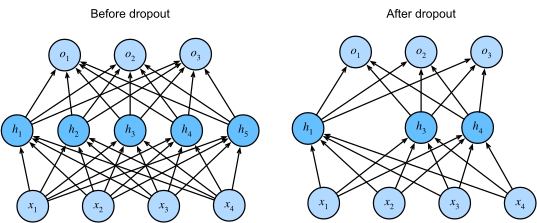
先ほど生成したおもちゃデータセットに戻り、ドロップアウトがノイズの多いデータセットでの訓練をどのように安定化させるかを可視化しましょう。先ほどのアーキテクチャを少し変更してドロップアウト層を追加します。
class NetDropout(nn.Module):
  """
  Network Class - 2D with the following structure:
  nn.Linear(1, 300) + leaky_relu(self.dropout1(self.fc1(x))) # First fully connected layer with 0.4 dropout
  nn.Linear(300, 500) + leaky_relu(self.dropout2(self.fc2(x))) # Second fully connected layer with 0.2 dropout
  nn.Linear(500, 1) # Final fully connected layer
  """

  def __init__(self):
    """
    Initialize parameters of NetDropout

    Args:
      None

    Returns:
      Nothing
    """
    super(NetDropout, self).__init__()

    self.fc1 = nn.Linear(1, 300)
    self.fc2 = nn.Linear(300, 500)
    self.fc3 = nn.Linear(500, 1)
    # We add two dropout layers
    self.dropout1 = nn.Dropout(0.4)
    self.dropout2 = nn.Dropout(0.2)

  def forward(self, x):
    """
    Forward pass of NetDropout

    Args:
      x: torch.tensor
        Input features

    Returns:
      output: torch.tensor
        Output/Predictions
    """
    x = F.leaky_relu(self.dropout1(self.fc1(x)))
    x = F.leaky_relu(self.dropout2(self.fc2(x)))
    output = self.fc3(x)
    return output
# @markdown #### Run to train the default network
set_seed(seed=SEED)
# Creating train data
X = torch.rand((10, 1))
X.sort(dim = 0)
Y = 2*X + 2*torch.empty((X.shape[0], 1)).normal_(mean=0, std=1) # adding small error in the data
X = X.unsqueeze_(1)
Y = Y.unsqueeze_(1)
# Creating test dataset
X_test = torch.linspace(0, 1, 40)
X_test = X_test.reshape((40, 1, 1))
# Train the network on toy dataset
model = Net()
criterion = nn.MSELoss()
optimizer = optim.Adam(model.parameters(), lr=1e-4)
max_epochs = 10000
iters = 0
running_predictions = np.empty((40, (int)(max_epochs/500 + 1)))
train_loss = []
test_loss = []
model_norm = []
for epoch in tqdm(range(max_epochs)):
# Training
model_norm.append(calculate_frobenius_norm(model))
model.train()
optimizer.zero_grad()
predictions = model(X)
loss = criterion(predictions,Y)
loss.backward()
optimizer.step()
train_loss.append(loss.data)
model.eval()
Y_test = model(X_test)
loss = criterion(Y_test, 2*X_test)
test_loss.append(loss.data)
if (epoch % 500 == 0 or epoch == max_epochs - 1):
running_predictions[:, iters] = Y_test[:, 0, 0].detach().numpy()
iters += 1# Train the network on toy dataset
# Initialize the model
set_seed(seed=SEED)
model = NetDropout()
criterion = nn.MSELoss()
optimizer = optim.Adam(model.parameters(), lr=1e-4)
max_epochs = 10000
iters = 0
running_predictions_dp = np.empty((40, (int)(max_epochs / 500)))
train_loss_dp = []
test_loss_dp = []
model_norm_dp = []
for epoch in tqdm(range(max_epochs)):
# Training
model_norm_dp.append(calculate_frobenius_norm(model))
model.train()
optimizer.zero_grad()
predictions = model(X)
loss = criterion(predictions, Y)
loss.backward()
optimizer.step()
train_loss_dp.append(loss.data)
model.eval()
Y_test = model(X_test)
loss = criterion(Y_test, 2*X_test)
test_loss_dp.append(loss.data)
if (epoch % 500 == 0 or epoch == max_epochs):
running_predictions_dp[:, iters] = Y_test[:, 0, 0].detach().numpy()
iters += 1訓練が終わったので、訓練過程でモデルがどのように変化したかを見てみましょう。
# @markdown Animation! (Run Me!)
set_seed(seed=SEED)

fig = plt.figure(figsize=(8, 6))
ax = plt.axes()

def frame(i):
  ax.clear()
  ax.scatter(X[:, 0, :].numpy(), Y[:, 0, :].numpy())
  plot = ax.plot(X_test[:, 0, :].detach().numpy(),
                 running_predictions_dp[:, i])
  title = f"Epoch: {i*500}"
  plt.title(title)
  ax.set_xlabel("X axis")
  ax.set_ylabel("Y axis")
  return plot


anim = animation.FuncAnimation(fig, frame, frames=range(20),
                               blit=False, repeat=False,
                               repeat_delay=10000)
html_anim = HTML(anim.to_html5_video());
plt.close()
display(html_anim)
# @markdown Plot the train and test losses with epoch
plt.figure()
plt.plot(test_loss_dp, label='Test loss dropout', c='blue', ls='dashed')
plt.plot(test_loss, label='Test loss', c='red', ls='dashed')
plt.ylabel('Loss')
plt.xlabel('Epochs')
plt.title('Dropout vs Without dropout')
plt.legend()
plt.show()# @markdown Plot the train and test losses with epoch
plt.figure()
plt.plot(train_loss_dp, label='Train loss dropout', c='blue', ls='dashed')
plt.plot(train_loss, label='Train loss', c='red', ls='dashed')
plt.ylabel('Loss')
plt.xlabel('Epochs')
plt.title('Dropout vs Without dropout')
plt.legend()
plt.show()# @markdown Plot model weights with epoch
plt.figure()
plt.plot(model_norm_dp, label='Dropout')
plt.plot(model_norm, label='No dropout')
plt.ylabel('Norm of the model')
plt.xlabel('Epochs')
plt.legend()
plt.title('Size of the model vs Epochs')
plt.show()考えてみよう 2.1!: ドロップアウト
ドロップアウトありのモデルは、初期のドロップアウトなしモデルよりも良い性能を示したと思いますか?
# @title Submit your feedback
content_review(f"{feedback_prefix}_Dropout_Discussion")
セクション2.1: ドロップアウト実装上の注意点
-
ドロップアウトは訓練時のみ使用します。テスト時はモデル全体の重みを使うため、テスト前に必ず
model.eval()メソッドを呼ぶことが重要です。 -
ドロップアウトは訓練中にモデルの容量を減らすため、一般的にはドロップアウトを使う場合はより広いネットワークを用います。例えば、ドロップアウト確率が0.5の場合、その層の隠れニューロン数を2倍にすることが推奨されます。
次に、「Animal Faces」データセットでドロップアウトがどのように機能するかを見てみましょう。既存のモデルにドロップアウトを追加してから訓練します。
class AnimalNetDropout(nn.Module):
  """
  Network Class - Animal Faces with following structure
  nn.Linear(3*32*32, 248) + leaky_relu(self.dropout1(self.fc1(x))) # First fully connected layer with 0.5 dropout
  nn.Linear(248, 210) + leaky_relu(self.dropout2(self.fc2(x))) # Second fully connected layer with 0.3 dropout
  nn.Linear(210, 3) # Final fully connected layer
  """

  def __init__(self):
    """
    Initialize parameters of AnimalNetDropout

    Args:
      None

    Returns:
      Nothing
    """
    super(AnimalNetDropout, self).__init__()
    self.fc1 = nn.Linear(3*32*32, 248)
    self.fc2 = nn.Linear(248, 210)
    self.fc3 = nn.Linear(210, 3)
    self.dropout1 = nn.Dropout(p=0.5)
    self.dropout2 = nn.Dropout(p=0.3)

  def forward(self, x):
    """
    Forward pass of AnimalNetDropout

    Args:
      x: torch.tensor
        Input features

    Returns:
      x: torch.tensor
        Output/Predictions
    """
    x = x.view(x.shape[0], -1)
    x = F.leaky_relu(self.dropout1(self.fc1(x)))
    x = F.leaky_relu(self.dropout2(self.fc2(x)))
    x = self.fc3(x)
    output = F.log_softmax(x, dim=1)
    return output
# Set the arguments
args = {
'test_batch_size': 1000,
'epochs': 200,
'lr': 5e-3,
'batch_size': 32,
'momentum': 0.9,
'device': DEVICE,
'log_interval': 100
}
# Initialize the model
set_seed(seed=SEED)
model = AnimalNetDropout()
# Train the model with Dropout
val_acc_dropout, train_acc_dropout, _, model_dp = main(args,
model,
train_loader,
val_loader,
img_test_dataset)
# Initialize the BigAnimalNet model
set_seed(seed=SEED)
model = BigAnimalNet()
# Train the model
val_acc_big, train_acc_big, _, model_big = main(args,
model,
train_loader,
val_loader,
img_test_dataset)
# Train and Test accuracy plot
plt.figure()
plt.plot(val_acc_big, label='Val - Big', c='blue', ls='dashed')
plt.plot(train_acc_big, label='Train - Big', c='blue', ls='solid')
plt.plot(val_acc_dropout, label='Val - DP', c='magenta', ls='dashed')
plt.plot(train_acc_dropout, label='Train - DP', c='magenta', ls='solid')
plt.title('Dropout')
plt.ylabel('Accuracy (%)')
plt.xlabel('Epoch')
plt.legend()
plt.show()考えてみよう 2.2! ドロップアウトの注意点
ドロップアウトが悪影響を及ぼす場合はどんな時だと思いますか?また、モデル内での配置は重要だと思いますか?
# @title Submit your feedback
content_review(f"{feedback_prefix}_Dropout_Caveats_Discussion")
セクション3: データ拡張
所要時間の目安: 約15分
# @title Video 3: Data Augmentation
from ipywidgets import widgets
from IPython.display import YouTubeVideo
from IPython.display import IFrame
from IPython.display import display


class PlayVideo(IFrame):
  def __init__(self, id, source, page=1, width=400, height=300, **kwargs):
    self.id = id
    if source == 'Bilibili':
      src = f'https://player.bilibili.com/player.html?bvid={id}&page={page}'
    elif source == 'Osf':
      src = f'https://mfr.ca-1.osf.io/render?url=https://osf.io/download/{id}/?direct%26mode=render'
    super(PlayVideo, self).__init__(src, width, height, **kwargs)


def display_videos(video_ids, W=400, H=300, fs=1):
  tab_contents = []
  for i, video_id in enumerate(video_ids):
    out = widgets.Output()
    with out:
      if video_ids[i][0] == 'Youtube':
        video = YouTubeVideo(id=video_ids[i][1], width=W,
                             height=H, fs=fs, rel=0)
        print(f'Video available at https://youtube.com/watch?v={video.id}')
      else:
        video = PlayVideo(id=video_ids[i][1], source=video_ids[i][0], width=W,
                          height=H, fs=fs, autoplay=False)
        if video_ids[i][0] == 'Bilibili':
          print(f'Video available at https://www.bilibili.com/video/{video.id}')
        elif video_ids[i][0] == 'Osf':
          print(f'Video available at https://osf.io/{video.id}')
      display(video)
    tab_contents.append(out)
  return tab_contents


video_ids = [('Youtube', 'nm44FhjL3xc'), ('Bilibili', 'BV1Xw411d7Pz')]
tab_contents = display_videos(video_ids, W=854, H=480)
tabs = widgets.Tab()
tabs.children = tab_contents
for i in range(len(tab_contents)):
  tabs.set_title(i, video_ids[i][0])
display(tabs)
# @title Submit your feedback
content_review(f"{feedback_prefix}_Data_Augmentation_Video")データ拡張は訓練サンプル数を増やすためによく使われます。ここでは、各エポック後に訓練データにノイズを加えることで正則化を実現する効果を探ります。
PyTorchのtorchvisionモジュールには画像データセットに使えるいくつかの組み込みデータ拡張手法があります。よく使う手法は以下の通りです:
- ランダムクロップ
- ランダム回転
- 垂直反転
- 水平反転
# @markdown ####  Data Loader without Data Augmentation

# For reproducibility
g_seed = torch.Generator()
g_seed.manual_seed(SEED)


train_transform = transforms.Compose([
     transforms.ToTensor(),
     transforms.Normalize((0.5, 0.5, 0.5), (0.5, 0.5, 0.5))
     ])
data_path = pathlib.Path('.')/'afhq' # Using pathlib to be compatible with all OS's
img_dataset = ImageFolder(data_path/'train', transform=train_transform)

# Splitting dataset
img_train_data, img_val_data,_ = torch.utils.data.random_split(img_dataset, [250,100,14280])

# Creating train_loader and Val_loader
train_loader = torch.utils.data.DataLoader(img_train_data,
                                           batch_size=batch_size,
                                           num_workers=2,
                                           worker_init_fn=seed_worker,
                                           generator=g_seed)
val_loader = torch.utils.data.DataLoader(img_val_data,
                                         batch_size=1000,
                                         num_workers=2,
                                         worker_init_fn=seed_worker,
generator=g_seed)torchvision.transformsを使ってデータをランダムに拡張するDataLoaderを定義してください。詳細はこちらを参照してください。
# Data Augmentation using transforms
new_transforms = transforms.Compose([
                                     transforms.RandomHorizontalFlip(p=0.1),
                                     transforms.RandomVerticalFlip(p=0.1),
                                     transforms.ToTensor(),
                                     transforms.Normalize((0.5, 0.5, 0.5),
                                                          (0.5, 0.5, 0.5))
                                     ])

data_path = pathlib.Path('.')/'afhq'  # Using pathlib to be compatible with all OS's
img_dataset = ImageFolder(data_path/'train', transform=new_transforms)
# Splitting dataset
new_train_data, _,_ = torch.utils.data.random_split(img_dataset,
                                                    [250, 100, 14280])

# For reproducibility
g_seed = torch.Generator()
g_seed.manual_seed(SEED)

# Creating train_loader and Val_loader
new_train_loader = torch.utils.data.DataLoader(new_train_data,
                                               batch_size=batch_size,
                                               worker_init_fn=seed_worker,
                                               generator=g_seed)
# Set the arguments
args = {
'epochs': 250,
'lr': 1e-3,
'momentum': 0.99,
'device': DEVICE,
}
# Initialize the model
set_seed(seed=SEED)
model_aug = AnimalNet()
# Train the model
val_acc_dataaug, train_acc_dataaug, param_norm_dataaug, _ = main(args,
model_aug,
new_train_loader,
val_loader,
img_test_dataset)
# Initialize the model
set_seed(seed=SEED)
model_pure = AnimalNet()
val_acc_pure, train_acc_pure, param_norm_pure, _, = main(args,
model_pure,
train_loader,
val_loader,
img_test_dataset)
# Train and Test accuracy plot
plt.figure()
plt.plot(val_acc_pure, label='Val Accuracy Pure',
c='red', ls='dashed')
plt.plot(train_acc_pure, label='Train Accuracy Pure',
c='red', ls='solid')
plt.plot(val_acc_dataaug, label='Val Accuracy data augment',
c='blue', ls='dashed')
plt.plot(train_acc_dataaug, label='Train Accuracy data augment',
c='blue', ls='solid')
plt.axhline(y=max(val_acc_pure), c='red', ls='dashed')
plt.axhline(y=max(val_acc_dataaug), c='blue', ls='dashed')
plt.title('Data Augmentation')
plt.ylabel('Accuracy (%)')
plt.xlabel('Epoch')
plt.legend()
plt.show()# Plot together: without and with augmentation
plt.figure()
plt.plot([i.cpu().numpy().item() for i in param_norm_pure],
c='red', label='Without Augmentation')
plt.plot([i.cpu().numpy().item() for i in param_norm_dataaug],
c='blue', label='With Augmentation')
plt.title('Norm of parameters as a function of training epoch')
plt.xlabel('Epoch')
plt.ylabel('Norm of model parameters')
plt.legend()
plt.show()考えてみよう 3.1!: データ拡張
訓練データを拡張する他の方法を思いつきますか?(物体認識以外の問題も考えてみてください)
# @title Submit your feedback
content_review(f"{feedback_prefix}_Data_Augmentation_Discussuion")
考えてみよう 3.2!: 過剰パラメータ化モデル vs 小規模NN
なぜ小さなニューラルネットワークよりも過剰パラメータ化されたANNを正則化する方が良いのでしょうか?知っている正則化手法を考慮して、各グループで10分間議論してください。
# @title Submit your feedback
content_review(f"{feedback_prefix}_Overparameterized_vs_Small_NN_Discussuion")
セクション4: 確率的勾配降下法
所要時間の目安: 約20分
# @title Video 4: SGD
from ipywidgets import widgets
from IPython.display import YouTubeVideo
from IPython.display import IFrame
from IPython.display import display


class PlayVideo(IFrame):
  def __init__(self, id, source, page=1, width=400, height=300, **kwargs):
    self.id = id
    if source == 'Bilibili':
      src = f'https://player.bilibili.com/player.html?bvid={id}&page={page}'
    elif source == 'Osf':
      src = f'https://mfr.ca-1.osf.io/render?url=https://osf.io/download/{id}/?direct%26mode=render'
    super(PlayVideo, self).__init__(src, width, height, **kwargs)


def display_videos(video_ids, W=400, H=300, fs=1):
  tab_contents = []
  for i, video_id in enumerate(video_ids):
    out = widgets.Output()
    with out:
      if video_ids[i][0] == 'Youtube':
        video = YouTubeVideo(id=video_ids[i][1], width=W,
                             height=H, fs=fs, rel=0)
        print(f'Video available at https://youtube.com/watch?v={video.id}')
      else:
        video = PlayVideo(id=video_ids[i][1], source=video_ids[i][0], width=W,
                          height=H, fs=fs, autoplay=False)
        if video_ids[i][0] == 'Bilibili':
          print(f'Video available at https://www.bilibili.com/video/{video.id}')
        elif video_ids[i][0] == 'Osf':
          print(f'Video available at https://osf.io/{video.id}')
      display(video)
    tab_contents.append(out)
  return tab_contents


video_ids = [('Youtube', 'rjzlFvJhNqE'), ('Bilibili', 'BV1nM4y1K7wP')]
tab_contents = display_videos(video_ids, W=854, H=480)
tabs = widgets.Tab()
tabs.children = tab_contents
for i in range(len(tab_contents)):
  tabs.set_title(i, video_ids[i][0])
display(tabs)
# @title Submit your feedback
content_review(f"{feedback_prefix}_SGD_Video")セクション4.1: 学習率
このセクションでは、学習率がニューラルネットワークの訓練時に正則化として働く様子を見ます。まとめると:
- 小さい学習率は正則化効果が弱く、ゆっくりと深い極小値に収束する。
- 大きい学習率は正則化効果が強く、局所極小値を飛び越えてより広く平坦な極小値に収束しやすく、これが一般化性能を高めることが多い。
ただし、非常に大きい学習率はオーバーシュートや悪い局所極小値に陥る可能性があるので注意が必要です。
以下のブロックでは、異なる学習率でAnimalNetモデルを訓練し、正則化への影響を観察します。
# @markdown #### Generating Data Loaders

# For reproducibility
g_seed = torch.Generator()
g_seed.manual_seed(SEED)

batch_size = 128
train_transform = transforms.Compose([
     transforms.ToTensor(),
     transforms.Normalize((0.5, 0.5, 0.5), (0.5, 0.5, 0.5))
     ])

data_path = pathlib.Path('.')/'afhq' # Using pathlib to be compatible with all OS's
img_dataset = ImageFolder(data_path/'train', transform=train_transform)
img_train_data, img_val_data, = torch.utils.data.random_split(img_dataset, [11700,2930])

full_train_loader = torch.utils.data.DataLoader(img_train_data,
                                                batch_size=batch_size,
                                                num_workers=2,
                                                worker_init_fn=seed_worker,
                                                generator=g_seed)
full_val_loader = torch.utils.data.DataLoader(img_val_data,
                                              batch_size=1000,
                                              num_workers=2,
                                              worker_init_fn=seed_worker,
                                              generator=g_seed)

test_transform = transforms.Compose([
     transforms.ToTensor(),
     transforms.Normalize((0.5, 0.5, 0.5), (0.5, 0.5, 0.5))
     ])
img_test_dataset = ImageFolder(data_path/'val', transform=test_transform)
# With dataloaders: img_test_loader = DataLoader(img_test_dataset, batch_size=batch_size,shuffle=False, num_workers=1)
classes = ('cat', 'dog', 'wild')
# Set the arguments
args = {
'test_batch_size': 1000,
'epochs': 20,
'batch_size': 32,
'momentum': 0.99,
'device': DEVICE
}
learning_rates = [5e-4, 1e-3, 5e-3]
acc_dict = {}
for i, lr in enumerate(learning_rates):
# Initialize the model
set_seed(seed=SEED)
model = AnimalNet()
# Learning rate
args['lr'] = lr
# Train the model
val_acc, train_acc, param_norm, _ = main(args,
model,
train_loader,
val_loader,
img_test_dataset)
# Store the outputs
acc_dict[f'val_{i}'] = val_acc
acc_dict[f'train_{i}'] = train_acc
acc_dict[f'param_norm_{i}'] = param_norm# @markdown Plot Train and Validation accuracy (Run me)
plt.figure()
for i, lr in enumerate(learning_rates):
plt.plot(acc_dict[f'val_{i}'], linestyle='dashed',
label=f'lr={lr:0.1e} - validation')
plt.plot(acc_dict[f'train_{i}'], label=f'{lr:0.1e} - train')
print(f"Maximum Test Accuracy obtained with lr={lr:0.1e}: {max(acc_dict[f'val_{i}'])}")
plt.title('Optimal Learning Rate')
plt.ylabel('Accuracy (%)')
plt.xlabel('Epoch')
plt.legend()
plt.show()# @markdown Plot parametric norms (Run me)
plt.figure()
for i, lr in enumerate(learning_rates):
plt.plot([i.cpu().numpy().item() for i in acc_dict[f'param_norm_{i}']],
label=f'lr={lr:0.2e}')
plt.legend()
plt.xlabel('Epoch')
plt.ylabel('Parameter norms')
plt.show()上記のモデルでは、期待とは異なる現象が観察されました。なぜそうなったと思いますか?
セクション5: ハイパーパラメータ調整
所要時間の目安: 約5分
# @title Video 5: Hyperparameter tuning
from ipywidgets import widgets
from IPython.display import YouTubeVideo
from IPython.display import IFrame
from IPython.display import display


class PlayVideo(IFrame):
  def __init__(self, id, source, page=1, width=400, height=300, **kwargs):
    self.id = id
    if source == 'Bilibili':
      src = f'https://player.bilibili.com/player.html?bvid={id}&page={page}'
    elif source == 'Osf':
      src = f'https://mfr.ca-1.osf.io/render?url=https://osf.io/download/{id}/?direct%26mode=render'
    super(PlayVideo, self).__init__(src, width, height, **kwargs)


def display_videos(video_ids, W=400, H=300, fs=1):
  tab_contents = []
  for i, video_id in enumerate(video_ids):
    out = widgets.Output()
    with out:
      if video_ids[i][0] == 'Youtube':
        video = YouTubeVideo(id=video_ids[i][1], width=W,
                             height=H, fs=fs, rel=0)
        print(f'Video available at https://youtube.com/watch?v={video.id}')
      else:
        video = PlayVideo(id=video_ids[i][1], source=video_ids[i][0], width=W,
                          height=H, fs=fs, autoplay=False)
        if video_ids[i][0] == 'Bilibili':
          print(f'Video available at https://www.bilibili.com/video/{video.id}')
        elif video_ids[i][0] == 'Osf':
          print(f'Video available at https://osf.io/{video.id}')
      display(video)
    tab_contents.append(out)
  return tab_contents


video_ids = [('Youtube', 'HgkiKRYc-3A'), ('Bilibili', 'BV1E44y127Sn')]
tab_contents = display_videos(video_ids, W=854, H=480)
tabs = widgets.Tab()
tabs.children = tab_contents
for i in range(len(tab_contents)):
  tabs.set_title(i, video_ids[i][0])
display(tabs)
# @title Submit your feedback
content_review(f"{feedback_prefix}_Hyperparameter_tuning_Video")ハイパーパラメータ調整はしばしば難しく時間がかかりますが、良い一般化性能を得るために重要な工程です。探索をガイドするためにいくつかの手法があります。
- グリッドサーチ: すべてのハイパーパラメータの組み合わせを試す
- ランダムサーチ: ランダムに異なる組み合わせを試す
- 座標降下法: あるハイパーパラメータセットから始め、一つずつ変えて検証誤差が減る変更を受け入れる
- ベイズ最適化 / Auto ML: 類似問題で効果的だったハイパーパラメータセットから始め、局所探索(例:勾配降下)を行う
探索範囲や最初に最適化するパラメータなど、選択肢は多くあります。ドロップアウトの確率は0.5か0.2のどちらかがよく使われ、それ以外はあまり変わらないことが多いですが、ネットワークのサイズや深さは大きく影響します。類似問題で効果的だった設定を参考にするのが鍵です。
ネットワーク構造の調整を自動化する手法として*ニューラルアーキテクチャサーチ(NAS)*があります。NASは線形層、畳み込み層などのビルディングブロックを用いて新しい構造を設計し、グリッドサーチ、強化学習、勾配降下法、進化的アルゴリズムなど多様な手法で性能を最適化します。これには非常に高い計算リソースが必要です。詳細はこの記事を参照してください。
考えてみよう 5: 正則化手法の総括
今日学んだ正則化手法の中で、ネットワークに最も大きな効果を与えたのはどれだと思いますか?なぜそう思いますか?同じネットワークにすべての正則化手法を適用できますか?
# @title Submit your feedback
content_review(f"{feedback_prefix}_Overview_of_regularization_techniques_Discussion")
まとめ
おめでとうございます!NMA-DLの第1週を修了しました!
このチュートリアルでは、L1およびL2正則化、ドロップアウト、データ拡張などの正則化手法を学びました。最後に、SGDの学習率も正則化として働くことを見ました。興味深い論文はこちらにあります。
時間があれば、ボーナス教材の敵対的攻撃もぜひご覧ください!
ボーナス: 敵対的攻撃
所要時間の目安: 約15分
# @title Video 6: Adversarial Attacks
from ipywidgets import widgets
from IPython.display import YouTubeVideo
from IPython.display import IFrame
from IPython.display import display


class PlayVideo(IFrame):
  def __init__(self, id, source, page=1, width=400, height=300, **kwargs):
    self.id = id
    if source == 'Bilibili':
      src = f'https://player.bilibili.com/player.html?bvid={id}&page={page}'
    elif source == 'Osf':
      src = f'https://mfr.ca-1.osf.io/render?url=https://osf.io/download/{id}/?direct%26mode=render'
    super(PlayVideo, self).__init__(src, width, height, **kwargs)


def display_videos(video_ids, W=400, H=300, fs=1):
  tab_contents = []
  for i, video_id in enumerate(video_ids):
    out = widgets.Output()
    with out:
      if video_ids[i][0] == 'Youtube':
        video = YouTubeVideo(id=video_ids[i][1], width=W,
                             height=H, fs=fs, rel=0)
        print(f'Video available at https://youtube.com/watch?v={video.id}')
      else:
        video = PlayVideo(id=video_ids[i][1], source=video_ids[i][0], width=W,
                          height=H, fs=fs, autoplay=False)
        if video_ids[i][0] == 'Bilibili':
          print(f'Video available at https://www.bilibili.com/video/{video.id}')
        elif video_ids[i][0] == 'Osf':
          print(f'Video available at https://osf.io/{video.id}')
      display(video)
    tab_contents.append(out)
  return tab_contents


video_ids = [('Youtube', 'LzPPoiKi5jE'), ('Bilibili', 'BV19o4y1X74u')]
tab_contents = display_videos(video_ids, W=854, H=480)
tabs = widgets.Tab()
tabs.children = tab_contents
for i in range(len(tab_contents)):
  tabs.set_title(i, video_ids[i][0])
display(tabs)
# @title Submit your feedback
content_review(f"{feedback_prefix}_Adversarial_Attacks_Bonus_Video")入力データに摂動を加えて機械学習モデルを騙すことを「敵対的攻撃」と呼びます。これらの攻撃は高次元空間で複雑な決定境界を学習することの避けられない副産物です。用途によっては非常に危険です。
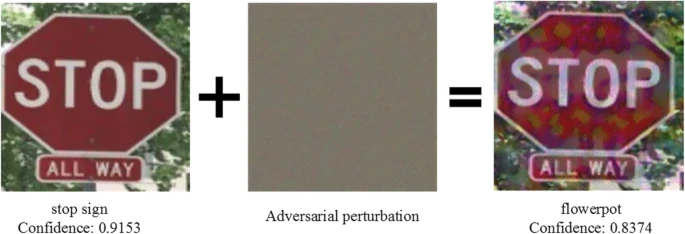
したがって、このような攻撃に対抗できるモデルを構築する必要があります。一つの方法はネットワークを正則化して決定境界を滑らかにすることです。敵対的攻撃に強いモデル構築の方法には以下があります:
- 防御的蒸留(Defensive Distillation): 蒸留で訓練されたモデルはソフトラベルで学習し、訓練過程にランダム性があるため攻撃に強い。
- 特徴圧縮(Feature Squeezing): 入力を圧縮する前後でモデルの予測を比較し、オンライン分類器の敵対的攻撃を検出する。
- SGD: 敵対者が最大化しようとするものを最小化する重みをSGDで選ぶことも可能。
敵対的攻撃についての詳細はこちらをご覧ください。